Are You Sure About That?Rules Lawyer: the free 5E rules assistant for Foundry VTT
Ask the rules in chat and get the answer from the book, with the page number. It rules on what's happening on the scene, and it checks character sheets. Mid-session, without anyone leaving the table to look it up.
Rules Lawyer runs inside Foundry, in each player's browser. There is nothing to sign up for, and nothing is sent outside your Foundry server.
Ask in chat
Start a message with /w rules (or /w lawyer) and ask in plain words. Small typos are fine.
It answers from the book
The answer comes from the rules it carries, the free SRD 5.2.1, and from the rules modules you've installed in Foundry, read where they already are.
It shows its work
Every answer says where it comes from (the book and page, a module's entry, or your ruling) and how sure it is. When the rules leave something open, it says "Not sure" and the GM rules on it.
Not an AI chatbot
A rules engine that learns your table, not a language model guessing
No AI writes the answers. Rules Lawyer holds the rules as data: every spell, condition, item and rule is an entry tied to its page. It works each answer out from those, step by step, the way a referee checks the book.
It doesn't invent answers. Everything it says comes from an entry, one of your modules, or one of your rulings, and names which. If none of them covers it, it tells you it doesn't know, and names the nearest things it does know.
The same question, the same answer. Ask about the same scene twice and you get the same ruling, with the same citations.
It learns from your table. When the rules leave something open and you rule on it, it remembers your ruling in that world and uses it from then on. You can list your rulings and undo any of them.
It runs inside Foundry. No question, character or ruling leaves your Foundry server. It needs no account and no online service.
Where AI did help: turning the book into data. Each entry was checked against its page by an AI review, then approved by an author.
Look it up
Spells, conditions, monsters, items, rules
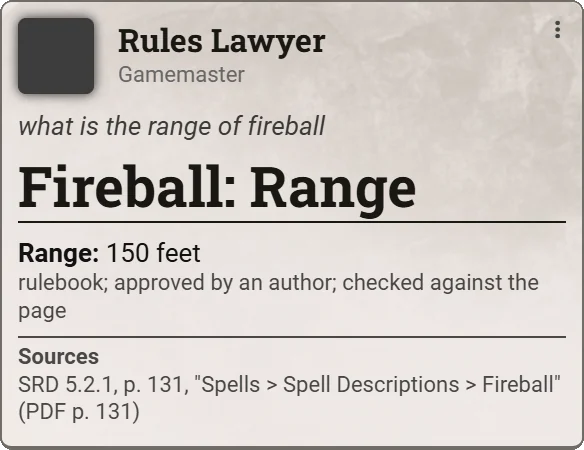
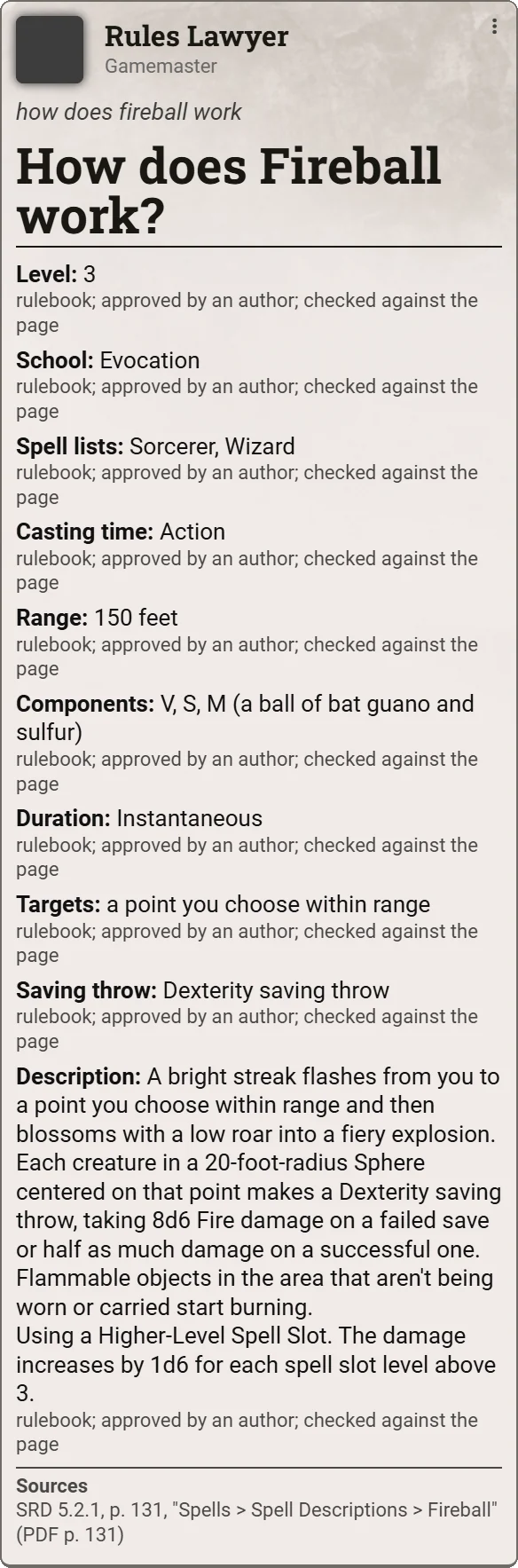
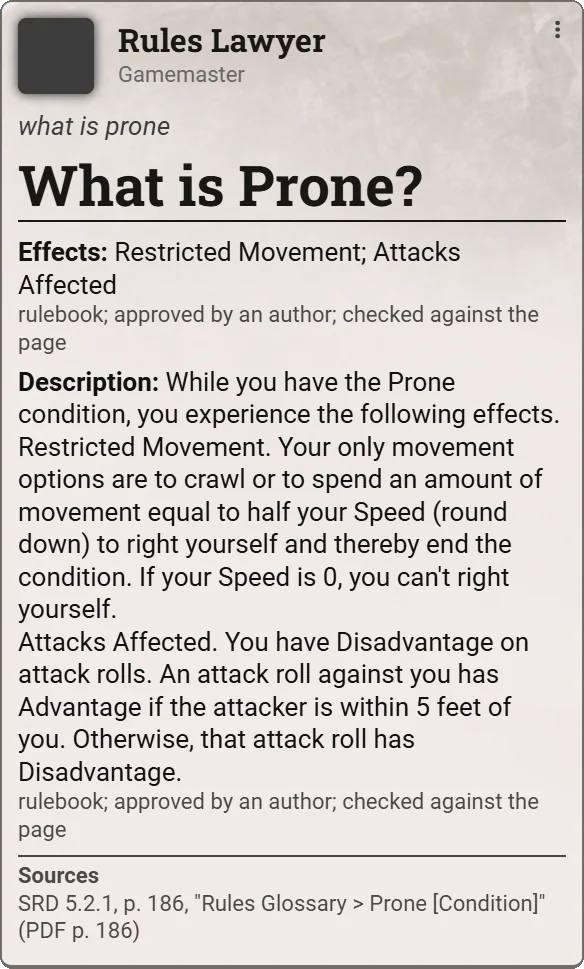
Ask how something works, what it is, or for one fact about it. The card gives the rule as the book words it, with the page.
Try
/w rules how does fireball work
/w rules what is prone
/w rules what is the range of fireball
/w rules how does fireball work
Rule on the scene
Who can I attack? Can I cast that at them?
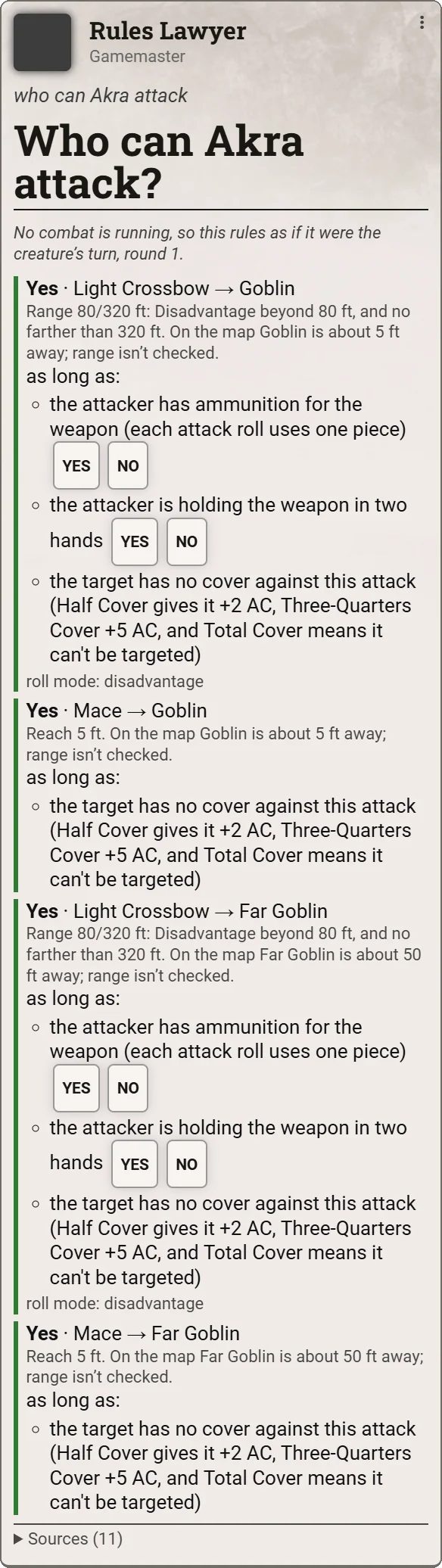
Select your token, target another, and ask. It reads the scene: who is where, what each creature carries, and the round of combat. Then it rules on each choice: Yes, No, or Not sure.
It names what the ruling assumes, like ammunition or a free hand, with Yes and No buttons.
It gives the distance on the map and the weapon's range, and leaves range calls to you.
When the rules don't settle it, the GM gets Allow, Deny and GM's call buttons.
Try
/w rules who can I attack
/w rules can I attack my target with my handaxe
/w rules can I cast fireball at my target
/w rules who can Akra attack
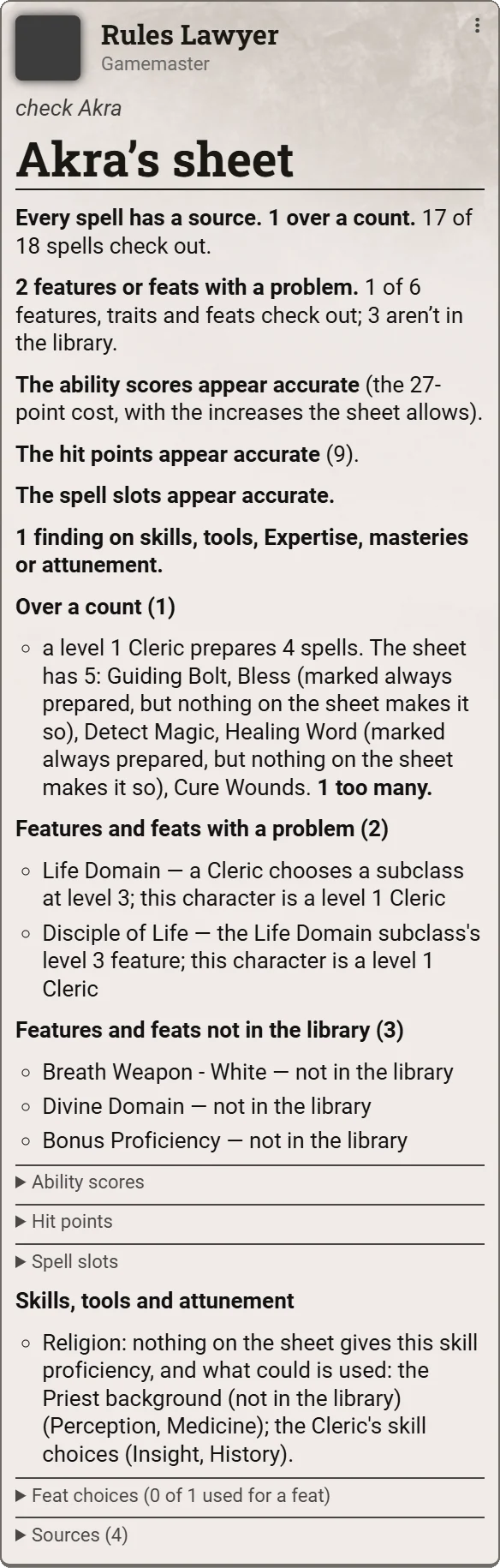
Check the sheet
Is everything on that character sheet allowed?
One command checks a character against the rules: spells and how many, features and feats, ability scores, hit points, spell slots, skills, tools and attunement. It reports. It never changes the sheet.
When a sheet has something the rules don't give, the GM can allow it, and the check counts it as allowed from then on.
Try
/w rules check Akra
/w rules can Akra cast sacred flame
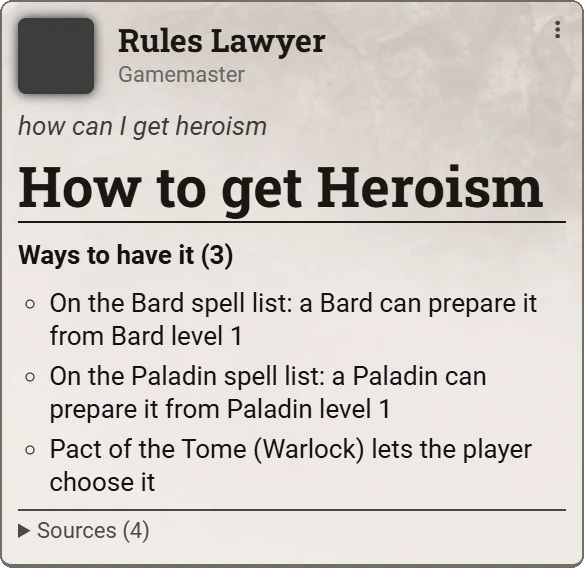
/w rules how can I get heroism
/w rules check Akra
More of it in action
Real answers, straight from chat
Every card on this page is a screenshot from Foundry, using only the free SRD 5.2.1. The speaker's picture is left blank.
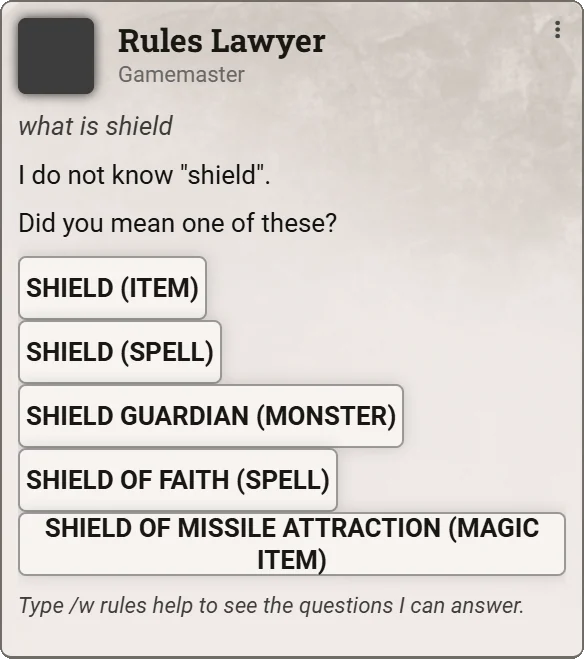
When a word could mean several things, it asks with buttons.
Every way a character can get a spell.
Conditions, word for word.
Lists, filtered by any fact.
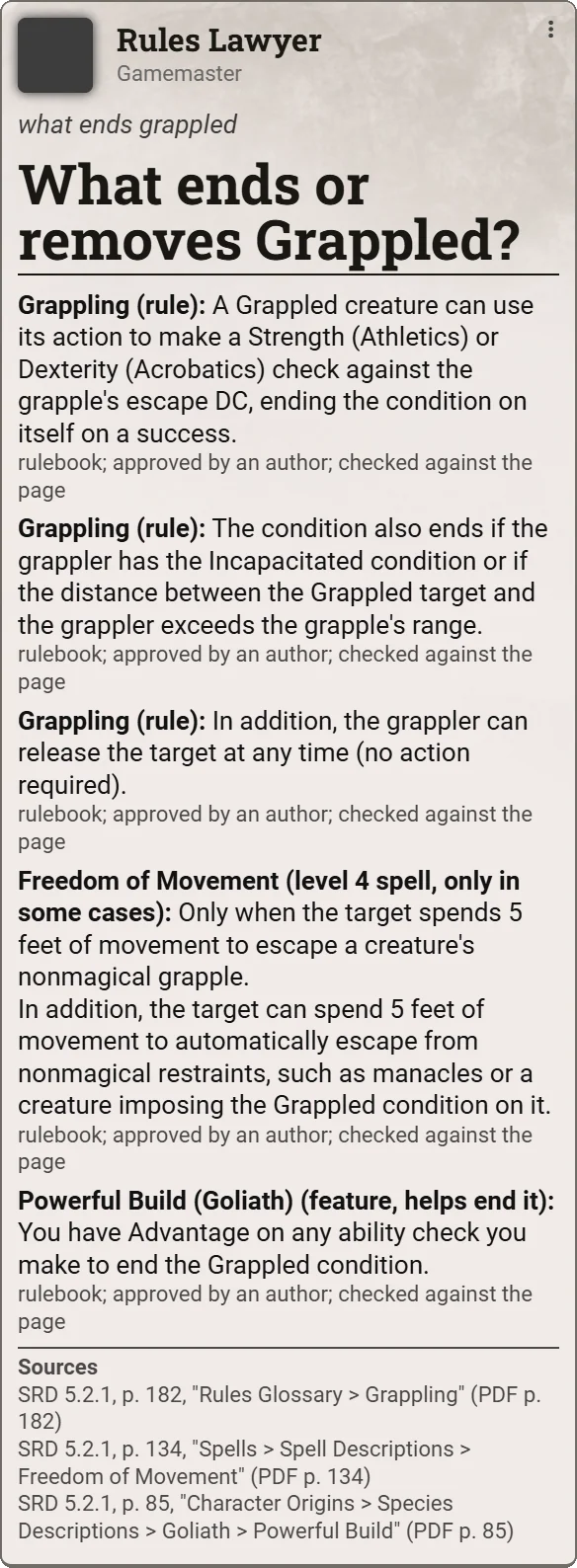
Everything that ends a condition, from every chapter.
Commands
What you can ask
Start with /w rules or /w lawyer. Who sees the answer follows your chat mode: public, private to the GM, blind, or only you. "I" means the token you have selected; "my target" means the token you targeted.
The basics
For new players, or a quick refresher.
/w rules how do I play
/w rules how does combat work
/w rules how do I make a character
/w rules what are stats
Look something up
How it works, what it is, or one fact.
/w rules how does fireball work
/w rules what is prone
/w rules what is the range of fireball
/w rules how much does a longsword cost
/w rules does bag of holding require attunement
Conditions
What ends one, causes one, or protects from one.
/w rules what ends grappled
/w rules what causes incapacitated
/w rules what grants immunity to frightened
Lists
list <type> where <fact> = <value>, joined with "and".
/w rules list spells where level = 3 and school = evocation
/w rules list spells where level = 9
Rulings on the scene
Every weapon, target or spell slot, ruled and listed.
/w rules who can I attack
/w rules can I attack my target with my handaxe
/w rules can I cast fireball at my target
/w rules can I cast cure wounds with a level 2 slot at my target
Character sheets
The answer always reaches the GM as well as you.
/w rules check Bill
/w rules can Bill cast shield
/w rules can Bill take grappler
/w rules how can I get heroism
For the GM
Rulings and the allow list, kept in your world.
/w rules allow Bill witch bolt because an old magic item
/w rules allowed
/w rules rule can I cast alarm at my target: deny because it takes too long
/w rules rulings
/w rules forget R-7001
Lost? /w rules help shows every form of question, with an example of each.
No hidden rulings. It says where every answer comes from.
Each part of an answer is labelled with its source, and a library entry also says how far it has been checked.
Rulebook
The SRD 5.2.1, cited to its page. Each entry was checked against its page by an AI review, then approved by an author.
Module
A rules module you've installed in Foundry, labelled "as the module gives it, not checked against the book", with a link that opens its entry.
GM ruling
A ruling you made in this world. A ruling never overrides what the rules settle. It only fills in what they leave open.
Yes: the rules allow it, as long as what it names holds
No: a rule forbids it, and the card says why and cites it
Not sure: the rules leave it open, so the GM decides
For the GM
Your table, your calls
Rule once, and it remembers. When a ruling comes back "Not sure", press Allow, Deny or GM's call on the card. The engine uses your ruling from then on in that world.
The allow list. Let a character keep something the sheet check flags, like a spell from an old magic item, and say why.
Your own books. Choose which rules modules it reads. Their spells, classes, items, monsters and rules text join the answers, labelled as theirs. Adventure entries stay GM-only by default, so no spoilers.
Who sees what. Choose which roles see monster stat blocks, magic items, treasure and adventure entries.
Older books. An answer only a book written for the 2014 rules gives is marked unsure until you accept it. Or set the world to use older books as rules.
Migrate rulings from world to world. Export a world's rulings, allow list and settings to a file, and import them into another.
Everything stays in your world. Rulings, allowances and settings are kept in that world only. Nothing leaves your Foundry server.
What it doesn't do. It doesn't watch the map for range, sight or cover; those stay yours. It doesn't guess: what it can't answer, it says so. And it never changes a sheet.
Version 0.1.3 · early release
Free for every table
Rules Lawyer is free to install and use. It isn't on Foundry's package list yet, so for now you install it from here.
In Foundry's setup screen, open Add-on Modules and choose Install Module.
Paste this into Manifest URL at the bottom, and choose Install:
Launch your world, open Manage Modules, and turn on Are You Sure About That? - Rules Lawyer.
In chat, type /w rules help.
Or download the zip (0.6 MB) and unzip it into Data/modules/are-you-sure-about-that. Installing from the manifest lets Foundry tell you when there's an update. Read the guide.
Foundry Virtual Tabletop v14
Game system dnd5e 5.3 or later
Rules included SRD 5.2.1
Your own rules modules read where they're installed
Price free
Licence: free to install and use in any game, including streamed and paid ones. Please don't re-host or change the module.
Support
Support more development
Rules Lawyer is free and staying that way. If it saves your table time, a contribution on Ko-fi funds more development: more of the library checked against the book, and new features.
 Highly Regarded